Sometimes you need to delete all the snapshots that the macOS time machine do locally just because you want to get rid of something of because you need to reclaim that space. Before one could use sudo tmutil disablelocal to delete everything and then sudo tmutil enablelocal to enable the local snapshots again —since they are useful. However, that option is no longer available.
I recently needed to convert my Raspberry Pi 3 into a AirPlay receiver because I didn’t have any of my AirPort Express at hand and I wanted to play just music —not the entire collection of sounds my computer produce— on one of my old Hi-Fi Self Stereo System. So I searched on the internet and saw that it was totally possible to do it and I try it. I used as a source this article and I want share with you what steps I specifically followed.
Update Friday, 10th of May 2018: If you want to install R with all the capabilities you need to read this post too, and perhaps this one too.
Update Tuesday, 27th of March 2018: I just found out that seems you don’t just need to run sudo R CMD javareconf to configure Java an R, at least with the versions of Java 9.0.4 and R 3.4.4.
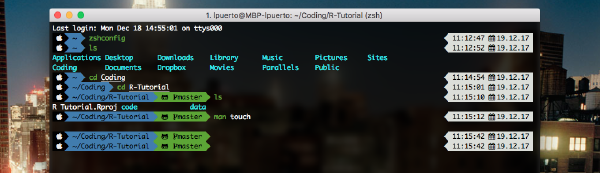
In general, I don’t use my Mac’s Terminal app. Instead, I use iTem2 with a special configuration, that doesn’t use Bash, but Oh My Zsh as a shell, that is a framework to manage Zsh configuration as your shell. This framework allows you to install plugins or configure your prompt, among other cool things. I’ve also configured iTerm2 to work with a patched Monaco1 font with the complete collection of nerd glyphs. The result is more of less what you can see in the featured image in this post, a beautiful and elegant shell that you can configure and enjoy use.
Update 2017.12.12-14.20 EET: whether or not I use the AMDGPUWakeHandler and whether I sleep or hibernate I can’t wake up of the hibernation/sleep. Depending on if I have AMDGPUWakeHandler on or off I get different outputs, but none of those end in a successful wakeup.
As I’ve told in the previous post, the discrete graphic car of my MacBook Pro late 2011 is faulty and can be trusted any more. So I decided to disconnect it.
Last Sunday wasn’t really a pleasant day. On Saturday late night, or rather around Sunday 00.30 am, my MacBook Pro late 2011’s discrete graphic card begin to fail to in the end not being able to boot it properly. The computer was working just fine, it wasn’t even using the discrete card, connected to the external screen as I’ve been doing lately, or any doing any other intensive task. I just rebooted it and 5’ after loading the desktop a solid gray screen appear that allowed to do nothing. After I forced reboot pushing the on/off button, the normal loading gray screen had glitches as thin-horizontal-weird lines. After 3 or 4 boots into the desktop and then the gray screen of dead the computer begin to load directly just to the gray screen of death. Nothing could be done to load the computer normally. I tried safe mode, pressing shift key on boot, and nothing, just the same gray screen of death. Restore mode, alt + R on boot, also the gray screen of death. So, I decided to left the issue to sleep —it was around 1.30 am in the morning, and led the computer to make a hardware test, pressing D key on startup.
In some of my previous post [e.g. 1, 2, 3 or 4 ] I’ve been using Homebrew to install some pieces of software in my Mac using the terminal, or shell. But, perhaps you’ve been wondering what is exactly Homebrew? It defines itself as “the missing package manager for macOS”. Yet… what is a package manager? A package manager is a small piece of software that helps you to manage other software —packages— in your computer, or in other words, to install, update, setup and uninstall software. Package managers have been a classic in most linux distributions and most linux users are accustomed to the idea to install software through them, whether on a GUI (graphical user interface) or just on a CLI (command line interface). You as a macOS user probably are also used to a GUI package manager, the Mac App Store, that allow you to install Apps easily and keep it updated. It doesn’t uninstall it for you, or clean the config files, though.
macOS High Sierra has changed the behavior of the media buttons on macOS —AKA those buttons you use to play/stop music or go forwards or backwards. Before, they were reserved to manage music, whether you where playing in iTunes or Spotify, with iTunes having preference (usually). They also worked with some video player.
High Sierra update on my machine. Yesterday, after a hard drive update, I updated my machine to macOS High Sierra. When I tried El Capitan, like almost two years ago, I thought that it was going to be the last OS my Mac was going to run. El Cap, as the Apple employees call it, was a really stable and reliable OS. I loved it, and it really run smoothly in my machine, where I had at that moment a custom Fusion Drive —120 GB SSD + 700 GB HDD, latter I upgrade to 1 GB due to a failure of the original hard drive (after 5 years) . At that moment I thought that any further update would create slowness and lagginess in my machine and after I’ve tried how smooth is a computer with an SSD on it, I really feel aversion to a slow machine. When Sierra went out I tried it, since I have to install the OS again, but didn’t feel right so I stick with El Cap.